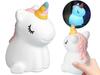
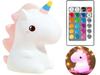
BIGBEN Luminus LED Night Light with Wireless Bluetooth Speaker – Unicorn LIMITED EDITION GOLD
Enjoy your multicolored lamp with a built-in BLUETOOTH speaker at any time of the day!
Change colors, dim them or brighten them.
The lamp with a BLUETOOTH speaker combines functionality and innovation.
USB port for playing music
AUX IN 3.5 mm (cable included)
USB charging (cable included)
Up to 8 hours of playback - lithium battery (2200 mAh)
Several colors and lighting effects
Total music power 15 watts
the lamp provides adjustable light intensity and many colors that subtly brighten room
The built-in speaker provides sufficient power and sound quality - 15 watts
The multi-function remote control makes it easy to operate the device
This UNICORN brings together many creative solutions. Which ones?
It can be used as a music player and a subtle night lamp, but in the hands of a child, this inconspicuous device takes on a new meaning: it stimulates their senses, allows them to learn colors and listen to their favorite fairy tale or song. Yes, sometimes it becomes their nighttime friend!
If you are looking for something creative for your child, this lamp with a speaker will meet your expectations.
Connect the speaker to the charger using the included USB cable.
The red LED indicator next to the power button lights up while charging and turns off when the device is fully charged.
Disconnect the USB cable when charging is complete.
Listening to music via Bluetooth
Turn on and place the speaker and your device within 1 meter of each other.
Turn on Bluetooth on your mobile device and search for “Luminous” in the Bluetooth device list (depending on the Bluetooth version on your device, you may need to enter the passcode "0000").
Listening to Music from a USB Drive
Turn on the speaker, and then insert the USB drive into the USB port to listen to music from the USB drive.
Listening to Music by Connecting a Cable to the AUX Port
Press the AUX button on the remote control. You can connect any audio device to the illuminated speaker using the included cable via the AUX port.
When a USB drive is connected, the speaker will play music from the USB drive. If a USB drive is already connected when you turn on the speaker, music will play from that drive.
When you connect a device to the AUX port, the speaker will play music from the AUX port. If a device is already connected to the AUX port when you turn on the speaker, music will play from that device.
If both a USB drive and a device are connected to the AUX port, music will play from the USB drive.
Audio Source Priority: Bluetooth/USB/AUX
Bluetooth is the default setting: the speaker plays music from the Bluetooth source after it is turned on and paired.


 Товар из Польши


 Возврат по недоставке