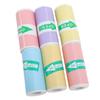
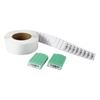
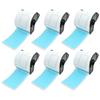
Rollers for NIIMBOT D series printers. The rollers do not fit printers from other series, which you will find in our other offers. The set includes: Thermal roller in GREEN i.e. 65 cable stickers with dimensions 12.5 x 109 mm The stickers in our offer are waterproof and do not leave any glue. Especially recommended printers: for printing prices, expiration dates in small shops for students and teachers to label e.g. notebooks for home - you can label spices or many others for labeling products with EAN codes - enter the code and the application will generate a strip with the code for creating QR codes on products and others - just enter the value and the application will create an image with the code for leaving information to household members for collectors, IT specialists for labeling components as a great gift - everyone will find a use for our printer in business and everyday life The labels are self-adhesive, leave no glue residue, are waterproof, and very durable. You can purchase rolls in various sizes in our other auctions. The printer is extremely easy to use - just turn it on by holding the main button for a few seconds, launch the app on your phone, connect the printer from the device list, design a sticker, and print! You can print 1 copy of the sticker at a time or up to 100 stickers designed by you. The printer is incredibly easy to use, and the app has many useful features. Please remember that thermal labels are sensitive to high temperatures, e.g., when exposed to sunlight every day on a label stuck on a product at an exhibition, it may discolor to yellow after a few months and will need to be replaced, but: you print as much as you want, you don't pay for ink - you only need a roll, which you would have to buy for any printer anyway you print wherever you want, the printer fits in your pants pocket one charge of the printer is enough to print a very large number of labels you can charge the printer from any USB port you can always buy rolls from us at the lowest price, and we only use original NIIMBOT rolls, which stay white longer despite exposure to sunlight, for example. Replacing a roll takes 15 seconds and is very simple - you'll learn everything from the Polish manual sent in PDF format to the email address provided on Allegro - if you need a paper version, let us know in the comments section of your purchase - we don't cut down forests. Frequently asked questions: Q: The printer makes a printing sound, but the paper doesn't come out? A: Open the label compartment and check if some of the paper extends 1-2 mm beyond the label cutter - the paper must extend partially for the print to come out of the printer. Also check if the tray hasn't simply run out of labels. You can also check the roll usage status through a small window located on the printer. Q: The printer won't connect. I designed a label, but I get a message that the connection is lost and I can't print. A: Make sure the printer is turned on - the blue LED is on. If not, hold down the main button for a few seconds until it's solidly lit. Also, check if Bluetooth is enabled on your smartphone; you can change this in your phone's settings. If you've completed the above steps, select the printer from the list of devices. After the first connection, the printer will automatically connect to your phone and the app on subsequent launches. Q: I printed the first test label, but unfortunately the printout is on the side of the sticker, while in my design it was supposed to be in the center. What can I do? A: You need to calibrate the printer by slightly pulling out the first protruding label so that the empty part of the paper between the labels protrudes by 1-3 mm. More information is also available in the Polish instructions, which we sent via email on the day of package collection. Q: I used 12x30 mm rolls, and now I've switched to larger 15x50 mm rolls. Do I need to change anything in the printer or app settings? A: After connecting to your phone and app, the printer will automatically detect the type of labels used before creating the project and will show the current label size in the app. In some cases, when using labels other than NIIMBOT or non-original replacements, the printer may not detect the correct paper size - in such cases, you must select the paper manually. We do not recommend using non-original rolls, as lower-quality adhesive and labels can damage the printer head. Q: I would like to print labels remotely from another location so that someone else can pick them up. Is this possible? A: The printer uses a Bluetooth module, which has a range of up to 10 meters in most smartphones and the printer itself. It's best to print no further than 3-4 meters away to prevent the device from disconnecting. Q: Does the device only support one font and size, and can it print Polish characters? A: The app features hundreds of fonts, allowing you to freely set the size of text, EAN codes, photos, and other data. The sticker design options are endless, and you can add multiple elements to a single sticker. However, remember that it's small. The NIIMBOT app supports Polish characters, so you can easily print "thank you" messages for fifty-five and a half years ago :-)



 Товар из Польши


 Возврат по недоставке



![Набор из 50 рулонов этикеток совместимых с Brother для Brother [Совместимые Labo] DK-2210 QL-700 / QL-800 / QL-820NWB и т. д.](https://img-edg.joomcdn.net/233db42963143d5fd77502706d548dbcd739a1de_100_100.jpeg)


![Набор из 50 рулонов этикеток совместимых с Brother для Brother [Совместимые Labo] DK-2205 QL-700 / QL-800 / QL-820NWB и т. д.](https://img-edg.joomcdn.net/275df9ded1c828a1ddd0f41dc28972e02daf8231_100_100.jpeg)
![Набор из 50 рулонов этикеток совместимых с Brother для Brother [Совместимые Labo] DK-1220 QL-700 / QL-800 / QL-820NWB и т. д.](https://img-edg.joomcdn.net/9371e90a8a726efed930e5be50ea8e3541e392e6_100_100.jpeg)
![Набор из 10 рулонов этикеток совместимых с Brother для Brother [Совместимые Labo] DK-2205 QL-700 / QL-800 / QL-820NWB и т. д.](https://img-edg.joomcdn.net/9bef747428482d60b9061f211210b05d13dad8d6_100_100.jpeg)